Agent Builder
A visual canvas that lets non-technical care teams build, tune, and ship AI voice agents for patient outreach. · 2026
Visit project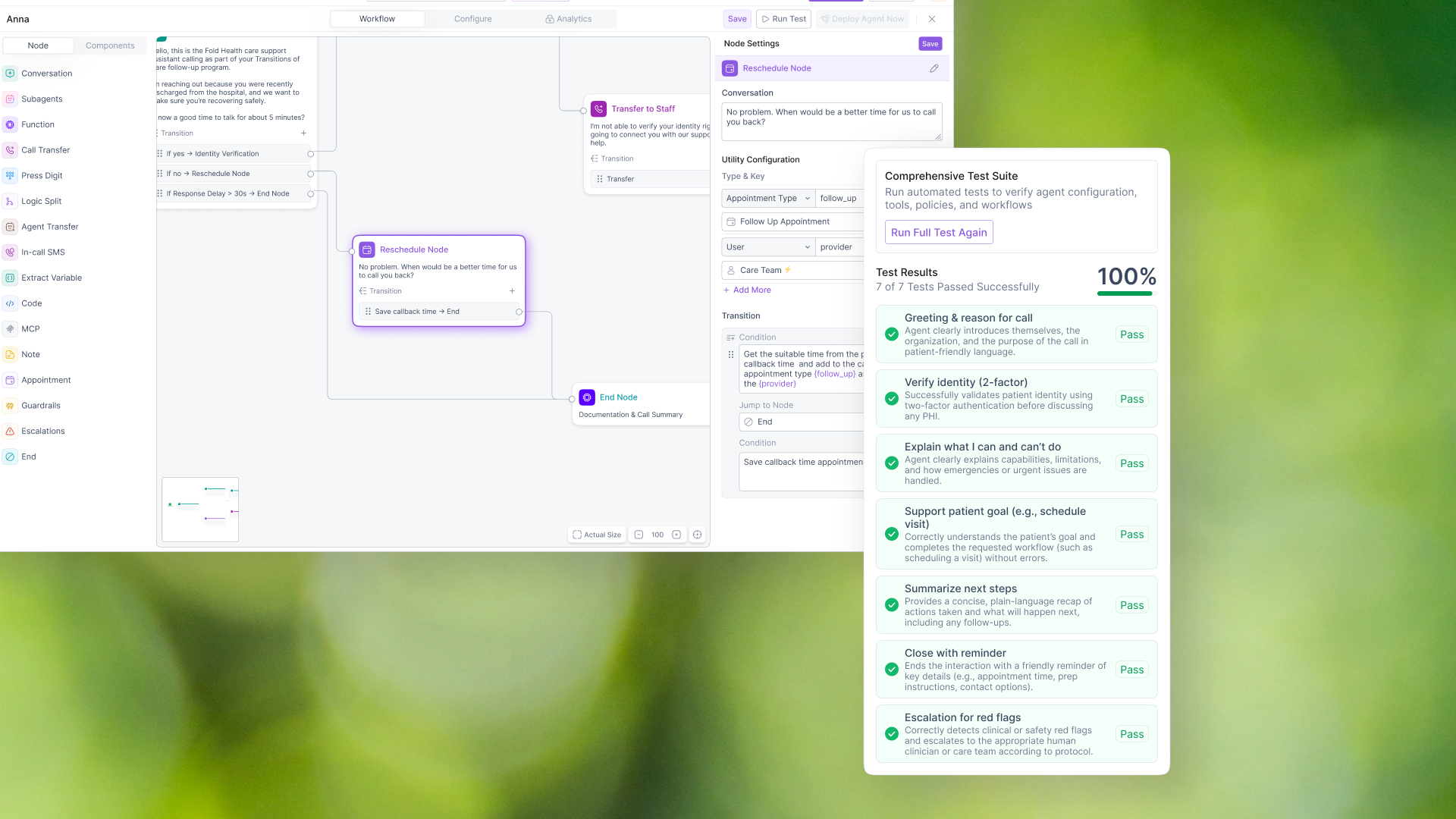
The idea
A node-based canvas where nurses and care coordinators assemble an AI voice agent out of typed building blocks — Conversation, Logic Split, Escalation, Guardrails — instead of writing a prompt or filing an engineering ticket.
The problem
Defining agent behaviour meant either one giant free-text system prompt — unreviewable, untestable, prone to regressions — or an engineering hand-off measured in days. In healthcare that fails twice over: safety rules like "if the patient mentions chest pain, escalate" cannot be a hopeful sentence buried in prose, and clinical leadership must be able to read what an agent will say before it dials a patient.
The solution
A three-mode workspace — Workflow, Configure, Analytics — built on an infinite canvas. 16 node types grouped by how care teams actually talk about calls (talk / act / decide / protect), each colour-coded so you can see where the safety net is from zoom-out. Branching lives on the node card as transition rows with their own handles, authored either in natural language or through a structured rule builder. Auto-save, versioning on every explicit save, and 50-step undo make experimenting safe.
Why this is unique
The taxonomy is the interface: most of the usability was decided before a screen was drawn, in choosing node types that map to the user's own vocabulary. Logic reads on the card rather than hiding in a settings panel, two authoring levels let each user work at their own precision, and the AI assistant emits ordinary canvas edits — visible, undoable, camera-followed — so it accelerates without ever bypassing the canvas.
| Product | Fold Health — care-orchestration platform for value-based care |
| Feature | Agent Builder (visual workflow canvas for AI voice/chat agents) |
| Role | Product design — end-to-end (research, IA, interaction design, visual design, design system, front-end prototyping) |
| Platform | Web app (React SPA) |
| Team | Design, engineering, clinical operations |
Overview
Fold Health helps care teams run proactive outreach programs — post-discharge follow-ups, chronic-care check-ins, medication adherence calls, appointment scheduling. Increasingly, that outreach is executed by AI voice agents that call patients on the care team's behalf.
The Agent Builder is the environment where those agents get made. It is a node-based canvas — in the family of Figma, Miro, and n8n — where a user assembles a conversation flow out of typed building blocks (Conversation, Logic Split, Call Transfer, Escalation, Guardrails, End…), wires them together with conditional transitions, configures the agent's global behavior (voice, language, safety fallbacks, call handling), and monitors its performance after deployment — all in one full-screen workspace with three modes: Workflow, Configure, and Analytics.
The hard part was the audience. The people who know what a good patient conversation looks like are nurses, care coordinators, and operations leads — not engineers. The builder had to expose real conditional-logic power (branching, variable extraction, equation rules, human-escalation paths) without ever looking like a programming tool.
Problem
The status quo
Before the builder, defining an agent's behavior meant one of two things:
- A prompt wall. One giant free-text system prompt that tried to describe an entire multi-turn phone call. It was unreviewable, untestable, and small edits caused unpredictable regressions in unrelated parts of the conversation.
- An engineering ticket. Clinical teams described the flow in a doc; engineers translated it into configuration. Every iteration — even changing one sentence of the greeting — took a hand-off cycle measured in days.
Why it mattered in healthcare specifically
- Safety is structural, not stylistic. "If the patient mentions chest pain, escalate to a human immediately" cannot be a hopeful sentence buried in a prompt. It has to be a visible, auditable branch in the flow.
- Compliance needs legibility. Clinical leadership must be able to read what an agent will say and do before it dials a patient. A prompt wall fails that review; a diagram passes it.
- Iteration is the product. Outreach scripts get tuned weekly based on call outcomes. If every tune-up requires engineering, the program stalls.
The design problem, stated plainly
How might we let a care-operations user express a branching, conditional, safety-constrained phone conversation — and trust what they built — without writing code?
Goal
For users
- Build and modify a conversation flow with direct manipulation — drag, drop, connect — no syntax.
- Always understand "what happens next" from any point in the conversation.
- Make safety behavior (guardrails, escalation, fallbacks) explicit and visible on the canvas.
- Never lose work; never fear experimenting.
For the business
- Collapse the iteration loop from days (design → ticket → deploy) to minutes (edit → save → version).
- Make agent behavior reviewable by clinical/compliance stakeholders before deployment.
- One workspace for the full lifecycle: build → configure → analyze.
Design principles I committed to early
- The canvas is the truth. Anything that changes behavior must be visible on the canvas, not hidden in a settings drawer.
- Borrow known grammars. Users already know Figma/Miro (select vs. pan, lasso, ⌘Z, zoom pills) and messaging apps (the assistant chat). Don't invent new physics.
- Progressive disclosure. A node shows its essence on the canvas; depth lives one click away in a side panel.
- Forgiveness over confirmation. Undo/redo, auto-save, versioning, and unsaved-changes guards instead of "Are you sure?" walls.
Process
1. Discovery
- Shadowed care coordinators running manual outreach and reviewed real call scripts to understand the shapes conversations take: greeting → identity verification → topic loop → branch on response → schedule/escalate/end.
- Audited how flows were being specified pre-builder (docs, spreadsheets, prompt files) and where translations to engineering broke down — mostly around branching conditions and escalation rules.
- Ran a competitive teardown of visual flow tools (Retell, Vapi, n8n, Zapier, Figma/FigJam) to separate table-stakes canvas conventions from differentiators.
2. Defining the vocabulary
The single most consequential decision was the node taxonomy. Too few types and everything collapses back into prompt walls inside one node; too many and the palette becomes a programming language.
I landed on 16 node types across four mental groups:
| Group | Node types |
|---|---|
| Talk | Conversation, Subagents (tool-calling dialogue) |
| Act | Function, Call Transfer, Press Digit, In-call SMS, Appointment, Code, MCP |
| Decide | Logic Split, Extract Variable, Agent Transfer |
| Protect & annotate | Guardrails, Escalations, Note, End |
Each type got a distinct accent color and icon so a flow is scannable from zoom-out — you can see where the safety net is (red escalation, amber guardrails) without reading a single label. The taxonomy lives as a single source of truth in the codebase (nodeConfig.js), so the palette, the canvas cards, and the settings panel can never drift apart.
We also added a second palette tab — Components — for pre-assembled healthcare blocks (Greeting, Verification, Med Check, Scheduling), so common patterns start at 80% instead of from zero.
3. Structure and layout
I converged on a three-column workspace after testing alternatives (modal settings, bottom drawers):
┌──────────────────────────────────────────────────────────────┐
│  ← Agent name · auto-save     [Workflow|Configure|Analytics] │
│                            undo redo · Save · Test · Deploy  │
├──────────┬───────────────────────────────────┬───────────────┤
│  Node    │                                   │ Node Settings │
│  palette │        Canvas (React Flow)        │      — or —   │
│  ────    │   minimap · zoom · auto-arrange   │ Workflow Asst │
│Components│   select/pan · versions           │ / Global Cfg  │
└──────────┴───────────────────────────────────┴───────────────┘
The right rail is contextual: with nothing selected it hosts the Workflow Assistant and Global Settings; selecting a node swaps it to that node's settings. One region, one job at a time — the canvas never gets covered by modals. The rail is resizable (260–480px) because prompt-editing wants width while canvas work wants space.
4. Prototype in production code
Rather than a Figma-only prototype, I built the interaction model directly in the React app (React Flow + our design system). Canvas feel — drag friction, zoom behavior, selection semantics — can't be evaluated in static frames. This let clinical users test with real flows and let us tune details (drop-position centering, click-to-zoom-on-node, transition drag-reorder) against real behavior.
5. Iterate on evidence
Usability sessions with care-ops users drove several revisions covered below — most notably the transition model on node cards, the dual Select/Pan canvas modes, and moving validation errors to the moment of save rather than on every keystroke.
Solution
The canvas
- Direct-manipulation flow editing on an infinite dotted canvas: drag node types from the palette, drop them where you point (the node centers on the cursor), connect them by dragging from a transition's handle to the next node.
- Nodes are readable cards, not chips. Each card shows its type (icon + color), name, prompt preview, and its full transition list — so the branching logic reads on the card itself, not only as edge spaghetti.
- Start and End are special. A green "Starts Here" node anchors every flow and cannot be deleted; End nodes are visually terminal. The settings panel for an End node replaces the editing form with a single explanatory line — "all paths should eventually lead here" — teaching the model instead of exposing empty fields.
- Wayfinding at any scale: a minimap (color-coded start/end/regular), zoom controls with a live percentage, Fit View, and one-click Auto-arrange that topologically sorts the graph into left-to-right execution layers when a flow gets messy.
Transitions: the logic model
Every branch is a transition owned by its source node, with two authoring levels:
- Prompt transitions — natural language ("If patient confirms", "If no answer") for the 90% case. This keeps logic in the user's own vocabulary.
- Equation transitions — a structured rule builder (
{variable} > value, All/Any matching, multiple rules) for the cases where natural language is too fuzzy, e.g.pain_level >= 7 → Escalate.
Transitions render as rows on the node card, each with its own connection handle, so one node can fan out to many targets and you can see every exit at a glance. They can be added from either the card (+) or the settings panel, reordered by dragging, and both surfaces stay in sync through shared state.
The right rail: three tools, one place
- Node Settings — rename inline, edit the conversation prompt (auto-growing textarea), manage transitions, and set per-node guardrails in addition to global ones. Delete is present but visually quiet and at the bottom.
- Workflow Assistant — a chat panel that operates on the canvas: "Add a medication check node", "Remove the escalation node", "Regenerate as a chronic care flow". Every assistant change lands as a normal canvas edit — visible, undoable, and followed by an auto fit-view so you see what changed. The assistant accelerates; it never bypasses the canvas.
- Global Settings — ten collapsible sections (Agent Identity, Global Prompt, Utility Variables, Interface, Voice, Speech, Call Settings, Security & Fallback, Summary Template, Welcome Message) covering everything from voice temperature and backchanneling ("uh-huh" affirmations) to voicemail behavior, silence timeouts, and what happens when the agent fails (transfer to human / retry / end gracefully). Only Identity is open by default; everything else is disclosure-on-demand.
Configure and Analytics tabs
- Configure reframes the same agent for a non-flow audience: use case, tone of voice, empathy and pacing sliders, language and accessibility adaptations (elderly-friendly pacing, plain language, hearing-impaired), policy templates (Emergency Escalation, Medication Adherence, Empathetic Communication), target population (pop-group / worklist / CSV upload), and communication preferences — with per-section completion badges acting as a soft checklist toward deployment.
- Analytics closes the loop in the same workspace: snapshot stat cards with semantic deltas, call-volume charts, a 24-hour uptime strip (idle → active → peak → degraded, hour by hour), billing, and a call log. Build, tune, and verify without leaving the builder.
Trust and forgiveness
- Auto-save silently persists the draft ~1.5s after edits stop, with a quiet "Saving… / Auto-saved" whisper next to the agent name.
- Explicit Save = version. Saving bumps a version (v1.0 → v1.1) into a version history where any prior version can be restored — which reframes saving as checkpointing, making experimentation safe.
- Undo/redo (⌘Z / ⌘⇧Z, 50 steps) covers every structural change, including assistant-made ones; a whole node drag reverses as a single undo step.
- Guarded exits. Closing with unsaved changes asks Discard / Save & Close; a browser-refresh guard backs it up.
- Validation at the right moment. Save with missing required global fields → the builder navigates you to the Workflow tab, flips the rail to Global Settings, and lights the exact fields inline. No error toasts pointing at nothing.
Workflow
The end-to-end user journey the builder supports:
- Open an agent → land on the Workflow tab; the flow loads at its saved viewport, exactly where you left it.
- Compose → drag node types (or healthcare Components) onto the canvas; drop where you point.
- Write the conversation → click a node (the canvas zooms and centers on it), edit its prompt and per-node guardrails in the rail.
- Branch → add prompt or equation transitions; drag from a transition's handle to its target node; reorder to set priority.
- Delegate → optionally ask the Workflow Assistant to add/remove/rewrite nodes or regenerate a whole flow, then refine by hand.
- Configure globally → identity, voice, speech, call handling, security fallbacks in Global Settings; audience, tone, and policies in Configure.
- Checkpoint → Save creates a version; the version dropdown lets you compare and roll back.
- Verify → Analytics tab for calls, outcomes, uptime, and the call log; return to step 2 to tune.
Screens
| Screen | What it does |
|---|---|
| Workflow canvas | The main stage: palette + infinite canvas + contextual rail. Dotted background, smoothstep edges, minimap, zoom pill, version pill. |
| Node card | Colored type icon, name, prompt preview, transition rows with individual output handles, optional "Verified Node" badge. |
| Node Settings rail | Identity row with inline rename, prompt editor, transition manager (prompt & equation builders), guardrails, delete. |
| Workflow Assistant rail | Chat thread with typing indicator; commands mutate the canvas directly. |
| Global Settings rail | 10 collapsible configuration sections with required-field validation. |
| Configure tab | Section cards with completion badges: use case, personalization, policies, target population, knowledge base, communication. |
| Analytics tab | Stat cards, area charts, 24-hour uptime strip, billing report, call log with per-call goal detail. |
| Version history | Dropdown of saved versions with dates and a "Current" badge; click to restore. |
| Unsaved-changes dialog | Discard vs. Save & Close on exit. |
Interactions
The details that make the canvas feel like a tool rather than a form:
- Select vs. Pan modes (V / H), mirroring Figma/Miro: in Select, left-drag draws a lasso and middle/right-drag pans; in Pan, left-drag pans. The cursor, the toggle pill, and the mode persist across reloads so the tool respects muscle memory.
- Click a node → the camera comes to you. Selection animates a fit-view onto that node (300ms), pairing the canvas focus with the settings panel opening.
- Drag-to-drop precision. Dropped nodes center under the cursor — a small fix (screen-to-flow coordinate math) that removed a constant "why did it land over there?" irritation.
- Multi-select and bulk delete. Lasso or ⌘/Shift-click extends selection; Delete/Backspace removes all selected nodes and their edges (Start node is protected), with a toast confirming "3 nodes deleted."
- Transition micro-interactions. Rows drag-reorder with live drop-target highlighting; clicking an already-active row plays a short shake — a wordless "you're already here" that killed repeated dead clicks in testing.
- Hover-to-learn palette. Node types reveal a tooltip card (icon, colored title, one-line behavior description) after a 250ms intent delay, so new users learn the vocabulary in place without a docs detour.
- Keyboard everywhere, safely. ⌘Z/⌘⇧Z/Y, V, H, Enter-to-commit and Esc-to-cancel on rename — all suppressed while typing in any input so shortcuts never eat text.
- Quiet status language. Auto-save whispers; explicit saves toast with the new version number; destructive actions confirm through undo-ability rather than interrogation.
Impact
Business metrics below are placeholders to be filled with production data.
- Iteration collapsed from a hand-off to a session. Flow changes that previously required an engineering ticket (multi-day cycle) are now made, versioned, and reviewable by the care-ops user in a single sitting.
- Safety became visible. Escalation paths, guardrails, and fallback behavior are explicit objects on the canvas and in settings — reviewable by clinical leadership before an agent ever dials a patient, rather than implied by prose in a prompt.
- One workspace, whole lifecycle. Build, configure, and analyze live under one roof, eliminating the context-switching between a flow tool, a config file, and a separate dashboard.
- The taxonomy scaled. Because the node vocabulary is a single config-driven source of truth, new node types (e.g., MCP, Code, Appointment) shipped as data additions — palette, canvas, and settings picked them up automatically with zero layout rework.
- Zero-loss editing. Auto-save + versions + 50-step undo effectively eliminated the "I lost my flow" failure mode and, just as importantly, the fear of experimenting.
- [Placeholder: time-to-first-deployed-agent, weekly flow-edit volume by non-engineering users, reduction in agent-config engineering tickets, call containment/escalation accuracy.]
Learnings
- A good taxonomy is the interface. Most of the builder's usability was decided before any screen was drawn — in choosing 16 node types that map to how care teams talk about calls (talk / act / decide / protect). When the vocabulary is right, the canvas mostly explains itself.
- Put the logic on the card. Early versions hid transitions inside the settings panel; flows read as mysterious spaghetti. Moving transition rows (with their own handles) onto the node card was the single biggest legibility win — branching became something you see, not something you audit.
- Two authoring levels beat one. Natural-language conditions alone were too fuzzy for clinical thresholds; a rule builder alone intimidated non-technical users. Offering prompt and equation transitions let each user work at their own precision level without splitting the product.
- AI assist must go through the same door. Making the Workflow Assistant emit ordinary canvas edits — visible, undoable, camera-followed — kept trust intact. An assistant that changed things invisibly would have poisoned confidence in the whole canvas.
- Prototype canvases in code. Drag friction, zoom feel, and selection semantics are invisible in static mockups. Building the interaction model in the real stack surfaced a dozen fixes (drop-point math, drag-vs-click conflicts inside nodes, input-focus shortcut collisions) that no Figma prototype would have caught.
- Forgiveness is a system, not a feature. Auto-save, versioning, deep undo, exit guards, and protected nodes only work because they were designed together — each covers a failure mode the others miss. Any one alone would still leave users afraid to touch a working flow.
- Validate at the moment of intent. Yelling about empty required fields while someone is still exploring is noise; routing them to the exact field at the moment they try to save is help. Timing, not severity, is what makes validation feel respectful.
Built with React 19, React Flow (@xyflow/react), Zustand, and the Fold Health design system (Inter typography, token-driven color, Solar linear iconography).